Apollo.io 2025: Redefining Sales Intelligence with AI-Powered Precision

In the fast-evolving landscape of B2B sales and outbound automation, Apollo.io has emerged as a cornerstone platform for professionals seeking data-driven growth. With its 2025 release, Apollo.io has not only refined its core capabilities but introduced transformative AI services that elevate the entire go-to-market (GTM) experience. This blog explores the platform’s latest innovations, contrasts them with previous iterations, and highlights why Apollo.io is now indispensable for tech-driven sales organizations.

From Data Aggregation to Intelligent Execution: The Apollo Evolution

Apollo.io’s earlier versions were lauded for their robust lead database, sequencing tools, and CRM integrations. Sales teams could identify ideal customer profiles (ICPs), build outreach campaigns, and track engagement—all within a unified interface. However, workflows often required manual stitching of tools, prompting users to toggle between platforms for research, messaging, and follow-up.

The 2025 update marks a paradigm shift. Apollo.io now offers an end-to-end GTM AI Assistant, designed to automate multi-step workflows with natural language commands. This isn’t just an upgrade—it’s a reinvention.

Key Features of Apollo.io 2025
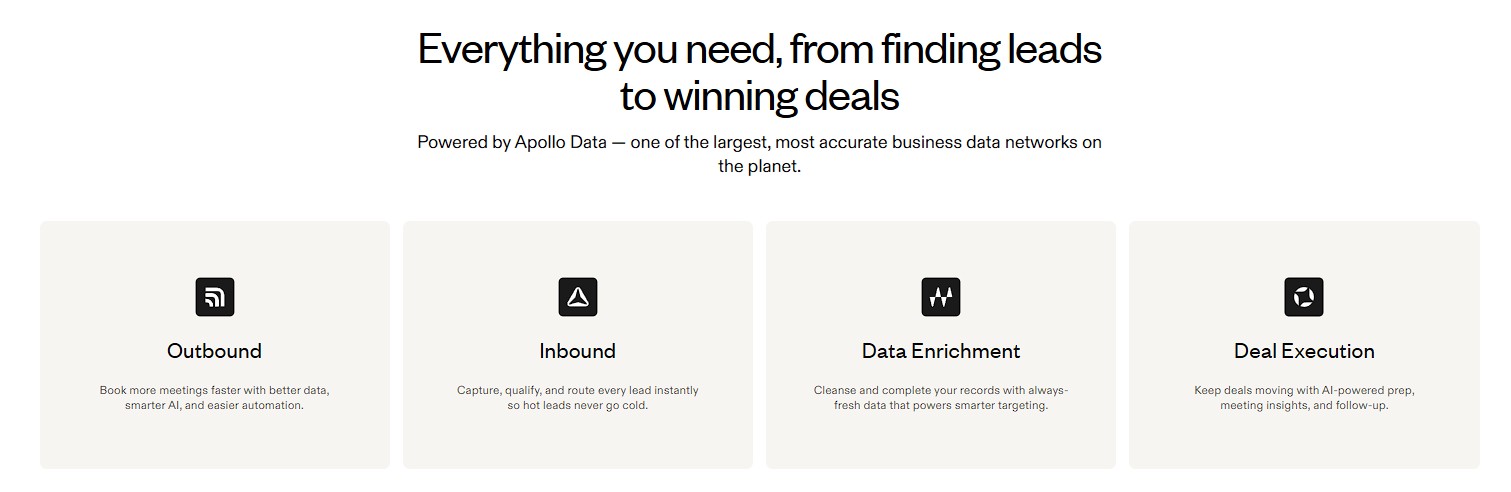
1. AI Assistant (Beta)

  • Embedded directly into the platform, the AI Assistant enables users to execute complex tasks—like identifying ICPs, crafting sequences, and scheduling follow-ups—simply by typing in plain English.
  • No need for prompt engineering or external AI tools. Apollo’s assistant is trained specifically for GTM workflows, ensuring business-relevant outputs in seconds.

2. ApolloNEXT Integration

  • Announced at ApolloNEXT 2025, this suite consolidates AI, data enrichment, and deliverability enhancements into a single experience.
  • Users can now run full-funnel campaigns without leaving the platform, reducing friction and boosting productivity.

3. Enhanced Data Intelligence

  • Apollo.io’s database has expanded to include deeper firmographic and technographic insights, enabling hyper-targeted outreach.
  • Real-time enrichment ensures that contact data remains fresh, accurate, and actionable.

4. Smart Sequencing & Personalization

  • AI-driven sequence recommendations based on industry, persona, and engagement history.
  • Dynamic personalization tokens and predictive send-time optimization improve open and reply rates.

5. Unified Reporting Dashboard

  • A redesigned analytics suite offers granular visibility into campaign performance, pipeline velocity, and team activity.
  • Customizable KPIs allow sales leaders to align metrics with strategic goals.

Comparing 2024 vs. 2025: What’s Changed?
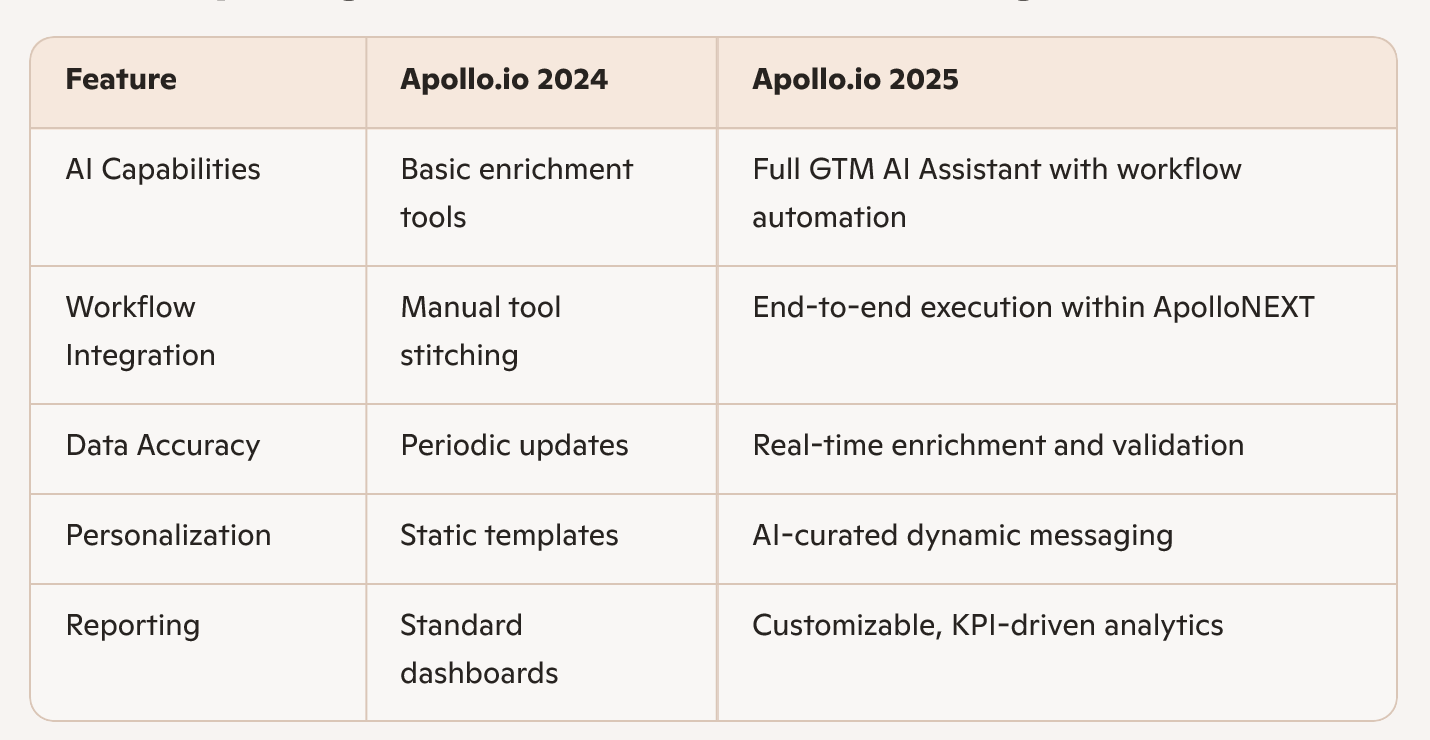
Why This Matters for Tech and Sales Professionals:
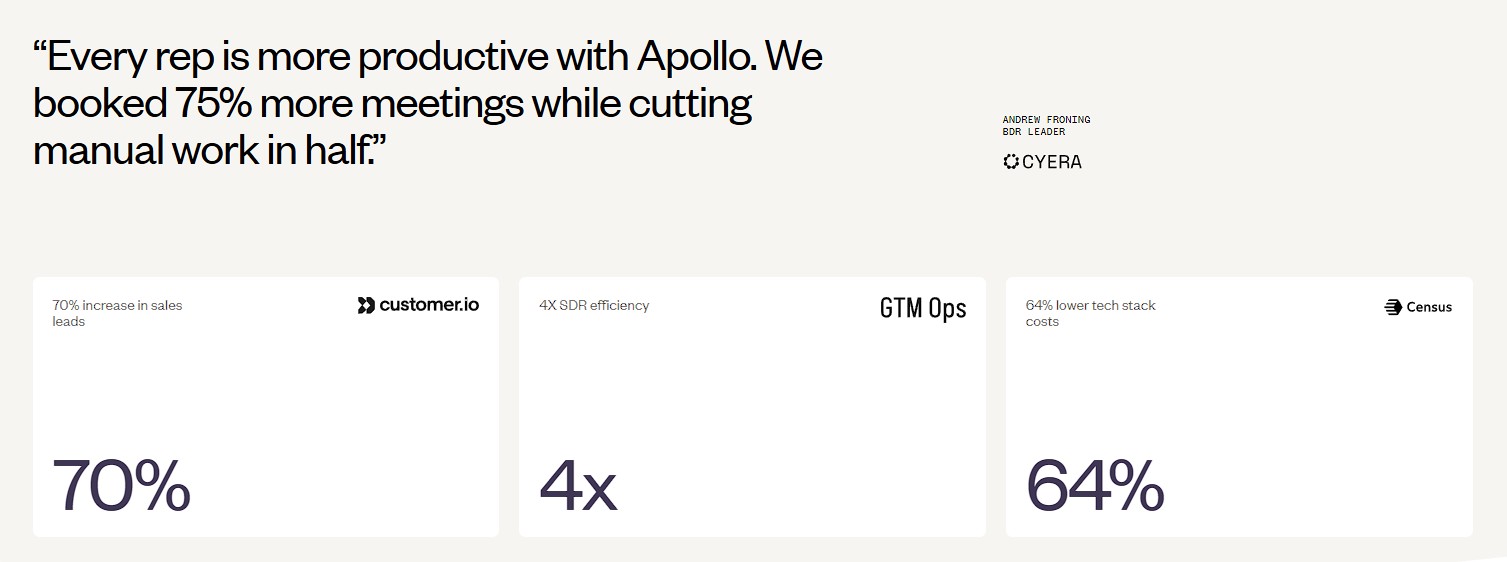
For startups, SaaS providers, and enterprise sales teams, the 2025 version of Apollo.io is more than a CRM enhancement—it’s a strategic asset. By embedding AI into every layer of the sales process, Apollo.io reduces time-to-value, enhances targeting precision, and empowers teams to scale intelligently.

Whether you’re building outbound campaigns, refining ICPs, or coaching SDRs, Apollo.io’s latest features offer unmatched agility and insight. The platform’s shift from data aggregation to intelligent execution positions it as a leader in the next wave of sales technology.

Final Thoughts:

Apollo.io 2025 isn’t just keeping pace with tech trends—it’s setting them. With its AI Assistant, enriched data intelligence, and seamless GTM workflows, Apollo.io is redefining what sales platforms can achieve. For professionals in tech and sales-driven businesses, adopting Apollo.io’s latest version isn’t just a smart move—it’s a competitive necessity.
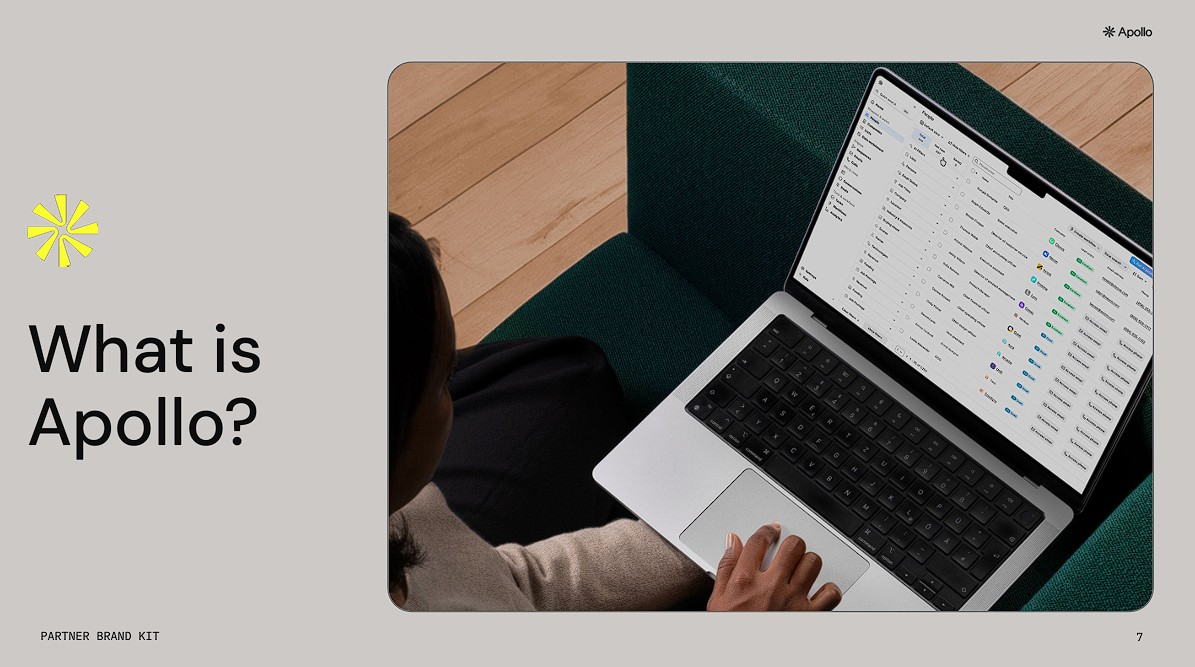
    Apollo.io Review: Is it still worth the hype in 2025?

    What is Apollo?

    Here’s a comprehensive review of Apollo.io — what it offers in 2025, where it shines, and whether it still deserves the hype. I’ll break it down into key areas so you can decide if it makes sense for your team.

    Apollo.io Features: How It Can Benefit Your Sales Team?

    🔑 Key Features of Apollo.io & What They Enable

    1. Vast B2B Database + Advanced Search/Targeting

    Feature Details:

    • Apollo claims a database of 200 + million contacts and 30‑70 + million companies.
    • You can filter/search by job title, seniority, industry, company size, technology stack (technographics), funding rounds, location etc.
    • Enrichment of existing leads/CRM records: add missing data, update outdated info.

    Benefits for your sales team:

    • Spend less time guessing who to reach; you can define your ideal customer profile (ICP) and pull lists quickly.
    • The ability to segment (e.g., “Mid‑sized SaaS companies in India using X tech stack”) helps refine outreach and increase relevance.
    • Enriched/cleaned data means less time wasted on bad contacts, fewer bounces, better ROI from outreach.

    Practical Tip / Caveat:

    • If you’re working in India (or specific states/regions), test how well the database covers your target geography — some global tools have weaker coverage in local markets.
    • Even with “verified” contacts, you’ll still want to validate before heavy outreach. Data quality can vary. (see later section)
    • Use filters wisely: too broad = lots of noise, too narrow = few leads.

    2. Multi‑Channel Sales Engagement (Sequences, Email, Calls, LinkedIn)

    Feature Details:

    • You can build automated sequences (multi‑step) across channels: email → call → LinkedIn task etc.
    • Built‑in dialer: make calls from within Apollo, record, transcribe, log to CRM.
    • Email deliverability features: domain/email warm‑up, SPF/DKIM/DMARC support, real‑time deliverability scoring.
    • LinkedIn + “manual task” steps: You can include LinkedIn connection/follow tasks in a sequence.

    Benefits:

    • Ensures consistent follow‑up: Many deals are lost because reps don’t follow up enough. A sequence automates that.
    • Brings efficiency: Reps spend less time on manual scheduling, leaving them more time for conversations.
    • Better outreach quality & volume: Multi-channel means you’re not just shooting emails — you’re engaging via calls and LinkedIn too, boosting response chances.
    • Centralized work: Reps don’t need to hop between multiple tools for email, calls, tasks — everything is in one place.

    Practical Tip / Caveat:

    • Don’t over‑automate to the point of sounding robotic. Use personalization tokens, include meaningful messages, adapt for your audience (India/region).
    • Ensure your local phone infrastructure supports the dialer well (for India, check call quality, local numbers, timezones).
    • Even with strong deliverability features, you still need to warm your domain/email, especially for cold outreach.
    • LinkedIn automation/manual steps: Be cautious with LinkedIn rules in your region (over‑automation can risk account problems).

    3. Workflow Automation + Playbooks (Sales Ops / SDR Efficiency)

    Feature Details:

    • Workflow engine / plays: Pre‑built templates, automations to trigger when leads hit certain signals (e.g., intent, headcount growth).
    • Task management: Keeps track of calls, emails, tasks, outbound actions.
    • Inbound lead optimisation: forms, routing rules, meeting scheduling.

    Benefits:

    • Makes SDRs more efficient: Less time managing logistics, more time engaging.
    • Helps enforce process consistency: Everyone on the team uses similar sequence/playbook templates — lowers variance, improves quality.
    • Aligns inbound + outbound: Not just cold prospecting — you can handle inbound enquiries, schedule meetings, route them to right rep.
    • Helps scaling: As you add reps, less training needed because workflows capture best‑practices.

    Practical Tip / Caveat:

    • Define your plays well: generic templates might not perform — tailor to your region, vertical, target roles.
    • Monitor that automations are kept updated — e.g., timezones for tasks, local holidays, business hours in India.
    • Don’t skip manual touches entirely. A hybrid of automation + personalisation often performs best.

    4. Analytics, Reporting & Sales Intelligence

    Feature Details:

    • Real‑time dashboards showing opens, replies, meetings booked, conversion rates, by sequence.
    • Lead/account scoring: Prioritise prospects based on fit + engagement.
    • Conversation intelligence: call transcriptions, summary, insights for coaching.
    • CRM integration to ensure pipeline data flows, can build board/pipeline views.

    Benefits:

    • Sales leaders get visibility into what’s working: sequence performance, which messages drive replies, which channels convert.
    • Enables data‑driven improvements: if certain sequences underperform in your region (say Bihar/India), you can iterate.
    • Helps coaching: Call recordings/transcripts allow managers to review rep calls, identify skill gaps.
    • Pipeline health: Ensures you don’t just have activity, but are actually closing deals.

    Practical Tip / Caveat:

    • Ensure you set up the right dashboards/KPIs for your business (e.g., cost per meeting, meeting‑to‑SQL in your region, bounce rates).
    • Integration with the CRM you use is critical — if data is stuck or inconsistent, dashboards become inaccurate.
    • Remember that metrics might differ by region — e.g., response rates in India may be different from US benchmarks, so use local benchmarks.

    5. CRM & Tool Integrations + Data Enrichment/Clean‑Up

    Feature Details:

    • Integrates with major CRMs (Salesforce, HubSpot) and email providers.
    • Enrichment capabilities: Add missing fields, clean old/outdated records, dedupe.
    • Synchronisation of activities (calls, emails) to CRM.

    Benefits:

    • Maintains a single source of truth for your sales pipeline — avoids fragmentation across tools.
    • Saves time: Reps don’t need to update dozens of systems manually.
    • Better data hygiene means fewer errors, less wasted outreach to bad leads.
    • Helps your sales & ops teams collaborate better: marketing can feed lists, sales can follow up, ops can monitor.

    Practical Tip / Caveat:

    • Check how robust the CRM integration is for your local stack (e.g., if you use a local CRM/stack in India).
    • Data hygiene is key: Garbage in = garbage out. Periodic cleaning is still required.
    • Ensure roles/permissions are set so only appropriate users can export or modify enriched data (especially relevant for privacy/compliance in India).

    🎯 How Your Sales Team Can Leverage Apollo.io Effectively

    • Define your ICP & localisation: E.g., mid‑market companies in Any region with 50‑200 employees, decision‑makers = “Head of Operations”, “CTO”, etc. Use Apollo filters to build that list.
    • Build customised sequences: Use language/timezone relevant tokens. For example: “Hi [FirstName], noticed your team in Patna is scaling …” rather than generic US‑centric messaging.
    • Use multi‑channel touches: Start with email → follow‑up call → LinkedIn connection. Mix channel types.
    • Track and iterate: Use Apollo’s analytics to see how many replies you’re getting, meetings booked, then tweak subject lines/time of sending.
    • Ensure email deliverability locally: Cold emailing in India may have different deliverability issues; use Apollo’s warm‑up features, ensure your domain is verified, respect local spam laws/regulations.
    • Segment by region/industry: Instead of “all India”, maybe build a segment just for Bihar/UP/North India, test how responsiveness differs.
    • Mix automation with human touch: After the first few automated steps, schedule a genuine call + personalised message — this hybrid approach often yields better results.
    • Train your team: Ensure your SDRs know how to use Apollo — setting tasks, using the dialer, reading the analytics dashboards.
    • Monitor costs/credits: Apollo uses credits (exports, mobile numbers etc). As you scale your team or list sizes, keep an eye on credit consumption.

    🚧 Key Caveats & What to Watch Out For

    While Apollo.io offers many benefits, there are a few things you should be mindful of:

    • Data quality and accuracy: Some users report bounce rates or outdated contacts. For example: > “Data accuracy concerns… some contact information seems outdated.”
    • Credit model / usage limits: Using large volumes of leads/exports can consume credits. Make sure you understand what’s included, what costs extra.
    • Channel mix maturity: Email is strong; call/LinkedIn features exist but may depend on your region (dialer quality, local regulations).
    • Implementation effort: For a small team, setup is fast; for a large enterprise with many reps, you’ll need processes, training, CRM hygiene.
    • Local/regional coverage: If your target market is Indian SMEs or regional firms, you’ll want to test how well Apollo covers those segments (many tools are stronger in US/UK).
    • Compliance & deliverability: Cold outreach in India has legal/regulatory considerations (e.g., respect for anti‑spam laws, DND lists). Make sure you use opt‑in/opt‑out practices.

    ✅ Summary — How It Benefits Your Sales Team

    In summary, if you implement Apollo.io well, the benefits to your sales team are:

    • Higher productivity: Reps spend less time on manual work (list building, data clean‑up, follow‑ups) and more time on conversations.
    • More targeted outreach: Better data + filters = more relevant prospects, higher reply/meeting rates.
    • Consistent process: Sequences + workflows enforce a repeatable, scalable approach rather than ad‑hoc outreach.
    • Better visibility for managers: Analytics let you measure what’s working, coach reps, pivot strategy.
    • Lower tool fragmentation: Instead of many tools (list builder + sequencer + dialer + CRM), you can unify many of those in one platform.

    Apollo.io Review: Top Pros and Cons

    ✅ Top 5 Pros

    1. Extensive contact & company database
      • Users highlight that Apollo gives access to hundreds of millions of contacts and many millions of companies, making lead‑generation much more scalable.
      • That depth of data helps teams find niche segments, filter by multiple attributes, and build target lists faster than starting from scratch.
    2. All‑in‑one sales & outreach platform
      • Apollo brings together prospecting, list‑building/enrichment, email sequences, dialer and some CRM‑integration functionality in one tool.
      • For many smaller teams this means fewer separate tools to manage, less switching, and potentially lower costs.
    3. User‑friendly interface & setup for basic usage
      • Many reviewers say that for basic operations (search + outreach) the tool is relatively intuitive and easy for a rep to pick up.
      • That’s beneficial especially if you have less experienced sales/SDR staff and want faster ramp‑up.
    4. Good value for money (especially for smaller teams or budgets)
      • Relative to some enterprise‑only tools, Apollo is often cited as offering strong feature‑set for the price.
      • The free or lower‑tier plan gives a way to test without huge investment.
    5. Strong multi‑channel outreach & automation
      • Features like email sequencing, follow‑ups, dialer integration and LinkedIn Chrome‑extension support increase outreach efficiency.
      • For a sales team this means better process consistency, less manual work and better chance of engaging prospects.

    ⚠️ Some Of  Top Cons

    1. Credit/usage limits & pricing complexity
      • Many users point out that while the pricing appears “affordable”, the credit system (exports, mobile numbers can complicate things and add hidden cost.
      • For example, scaling up your outreach may quickly hit credit limits or require a plan jump.
    2. Steep learning curve for advanced features
      • While basic usage is okay, when you move into more advanced sequences, workflow automation, custom integrations, many users say setup/usage gets complex.
      • If your team is small or lacks dedicated operations/training, this may slow things down.
    3. Customer support / integration issues
      • Some reviews mention slow response times from support, issues with onboarding, or sub‑par deeper integrations.
      • Example: “They came up with a new credit usage system but didn’t pass the benefits to us … it’s very frustrating to see them change credits usage so often.”
      • Although Apollo offers CRM‑type functionalities, multiple users say it does not match the depth of a specialized CRM or pipeline tool; tracking deals & advanced sales operations may need complementing tools.

    🧭 How to Choose the Right Plan for Your Business.

    Here are steps and criteria to help you pick the correct plan for your sales team, especially bearing in mind — which may affect data and outreach behaviour.

    1. Estimate Your Usage

    Ask yourself:

    • How many users (sales/SDR reps) need access?
    • How many contacts do you plan to export per rep/month?
    • How many mobile numbers do you need (for calls/outreach)?
    • How many outbound email sequences will you run?
    • Are you doing cold calling or multi‑channel (email + call + LinkedIn)?
    • Do you need advanced features (dialer, call recording, AI, international outreach)?

    Using those answers, estimate your required credits/month. Then check which plan’s included credits cover your needs (and by how much you might overshoot).

    2. Match Features to Your Team’s Needs

    • If you are mostly doing email outreach, low volume, small team → Basic may suffice.
    • If you add calling, higher volume, outreach across many channels → Professional is likely required.
    • If you are enterprise scale, need international outreach, advanced security/SOCs, many users → Organization is your target.
    • If you are just “testing” or very small budgets, the Free plan is good for trial but will likely cap you quickly.

    3. Consider Geography & Data Availability

    • Check how many contacts in your target industry/location are available in Apollo’s database. Even if plan allows “X credits”, data may be weaker in certain locales.
    • If you need phone numbers (local Indian mobiles/landlines), check how well Apollo’s mobile‑credit cost works with your region and needs.
    • Ensure email deliverability works locally (timezones, language, domain warm‑up). Extra features like dialer/international calling may or may not be region‑friendly.

    4. Budget for “Overage” / Additional Credits

    • Be realistic: many teams overshoot included credits. For example, if you need 50 mobile numbers per rep/month and the plan only gives 100 mobile credits total, you’ll pay extra.
    • Consider the cost of extra credits (often ~$0.20 per credit or minimum purchase bands) and factor that into your monthly budget.
    • Unused credits are lost — so plan your usage or budget accordingly.

    5. Choose Billing Cycle & Flexibility

    • Annual billing gives you lower cost/month (e.g., $49 vs $59) but commits you. If you expect rapid scaling or changes, monthly billing may be safer.
    • Also check cancellation/upgrade/downgrade policies to ensure you are not locked in unfairly.

    6. Monitor ROI & Scale Gradually

    • Start with a plan that covers your immediate needs rather than “go enterprise” from day one.
    • Use the free or lower tier to test: build lists, run sequences, test response rates in your region (India) and see how credits/deliverability pan out.
    • Monitor metrics: cost per meeting booked, conversion rate, bounce rate, mobile number reveal ROI. Then scale up plan/credits once you know what works.

    🧾 Probable Strategy for Your Context

    Given your region (India) and assuming a small‑to‑mid size B2B sales team, here’s how I would recommend approaching Apollo:

    • Phase 1: Trial/Free or Basic Plan
      Use the Free plan or Basic plan for 1 rep initially. Build a list of target companies in India/Bihar/nearby states, test outreach (email + LinkedIn) without heavy mobile number reveals. Measure: quality of data, response rate, bounce/invalid number rates.
    • Phase 2: Scale to Basic/Professional
      If the test is promising, upgrade to Basic or Professional for your core SDRs. Ensure you budget for extra credits (for Indian data may require more enriching/phone reveals).
    • Phase 3: Monitor & Adjust Credits/Plan
      Keep a close eye on credit consumption. If mobile calling or international outreach is large part of your strategy, you may need the Professional or Organization plan sooner.
    • Phase 4: Enterprise/Organization if you expand significantly
      If you scale to many reps, multiple regions, international markets, more complex GTM, then Organisation plan becomes relevant (with SSO, advanced security, etc).

    ✅ Key Takeaways

    • Apollo’s sticker plan cost looks affordable, but credit usage often drives the real cost.
    • Match your actual usage (users + exports + mobile numbers) with the plan’s quotas — otherwise you’ll face “hidden” overage costs.
    • In India, data coverage & mobile number quality may vary — test early to check if the platform fits your region.
    • Start with a modest plan and scale once you see results & understand your credit consumption.
    • Always check billing cycle, extra credit cost, unused credit policies.

    Conclusion: Is Apollo worth it?
    You’ll likely get good value if:

    You build the right internal process: define ICP, clean leads, personalise sequences, monitor deliverability. Apollo gives the features — you need to put in the work.

    You have an outbound‑heavy sales motion: building lists, doing email/phone/LinkedIn outreach. Apollo’s database + sequence engagement are strong assets.

    You are a small‑to‑mid size team (startup, growth team) with budget constraints and need to combine data + outreach in one tool rather than many separate platforms.

    You are willing to pilot the tool: test it in your region, validate data quality, measure results (meetings booked, conversion) before scaling.

    Apollo.io: The Ultimate Sales Engagement Platform for Modern Outreach

    In today’s competitive B2B landscape, sales teams need more than just a list of leads—they need precision, automation, and actionable data. Apollo.io has emerged as a powerful alternative to LinkedIn Sales Navigator, offering a comprehensive suite of tools for lead generation, outreach, and data enrichment. This blog dives deep into Apollo.io’s capabilities, pricing, and practical applications.

     Why Companies Choose Apollo.io

    Apollo.io is built to automate and turbocharge sales functions. Companies employ it to:

    – Scale their outreach and find new leads
    – Target specific buyer personas with accuracy
    – Execute automated LinkedIn and email campaigns
    – Enrich and clean existing customer lists
    – Seamlessly integrate with CRMs such as HubSpot and Salesforce
    – Monitor performance and optimize outreach strategies

     Standout Features That Make Apollo Shine

    1. Lead Database & Advanced Search
    Apollo.io has more than 275 million contacts, so it is a treasure trove for prospecting. Apollo.io allows filtering leads by:

    – Industry
    – Job title
    – Location
    – Company size
    – Intent signals

    You can create buyer personas by hand or leverage Apollo’s AI to do it for you. Although Apollo’s data is cached and can be lagging behind real-time LinkedIn scraping tools such as Phantombuster, for most outreach purposes, it is extremely effective.

    2. List Management & Segmentation
    Apollo.io simplifies the handling of large-volume campaigns:

    – Segment contacts at different engagement levels, industry, or title
    – Build custom lists for targeted outreach
    – Filter and tag contacts for easy access
    – Enrich data to verify accuracy
    – Do bulk operations like email sends or exports

    3. Direct Outreach Integration
    Apollo.io closes the gap between lead discovery and engagement:

    – Send email campaigns with pre-built templates
    – Follow up automatically through sequences
    – Monitor opens, clicks, and replies
    – Utilize the dialer for direct dials
    – Set tasks and sync with your calendar

    4. Data Enrichment & Health
    Freshen up your CRM and contact lists:

    – Swap out old or missing data
    – Identify duplicates and job changes
    – Enrich CSV files and CRM records
    – Leverage Apollo’s API for real-time enrichment on any platform

    5. Email Sequences & Automation
    Craft personalized, automated email sequences:

    – Personalize fields such as name, company, or job title
    – Trigger based on recipient behavior
    – Perform A/B testing to improve performance

     Note: Email deliverability in Apollo can be unreliable. For best results, try integrating tools like Woodpecker or Lemlist.

    6. Multi-Mailbox Linking
    Handle multiple email addresses from a single dashboard:

    – Link Gmail, Outlook, and more
    – Leverage a single inbox to monitor all interactions
    – Select sender accounts for every campaign

    7. Outreach Analytics
    Apollo.io offers real-time campaign performance insights, enabling teams to better optimize strategies and maximize ROI.

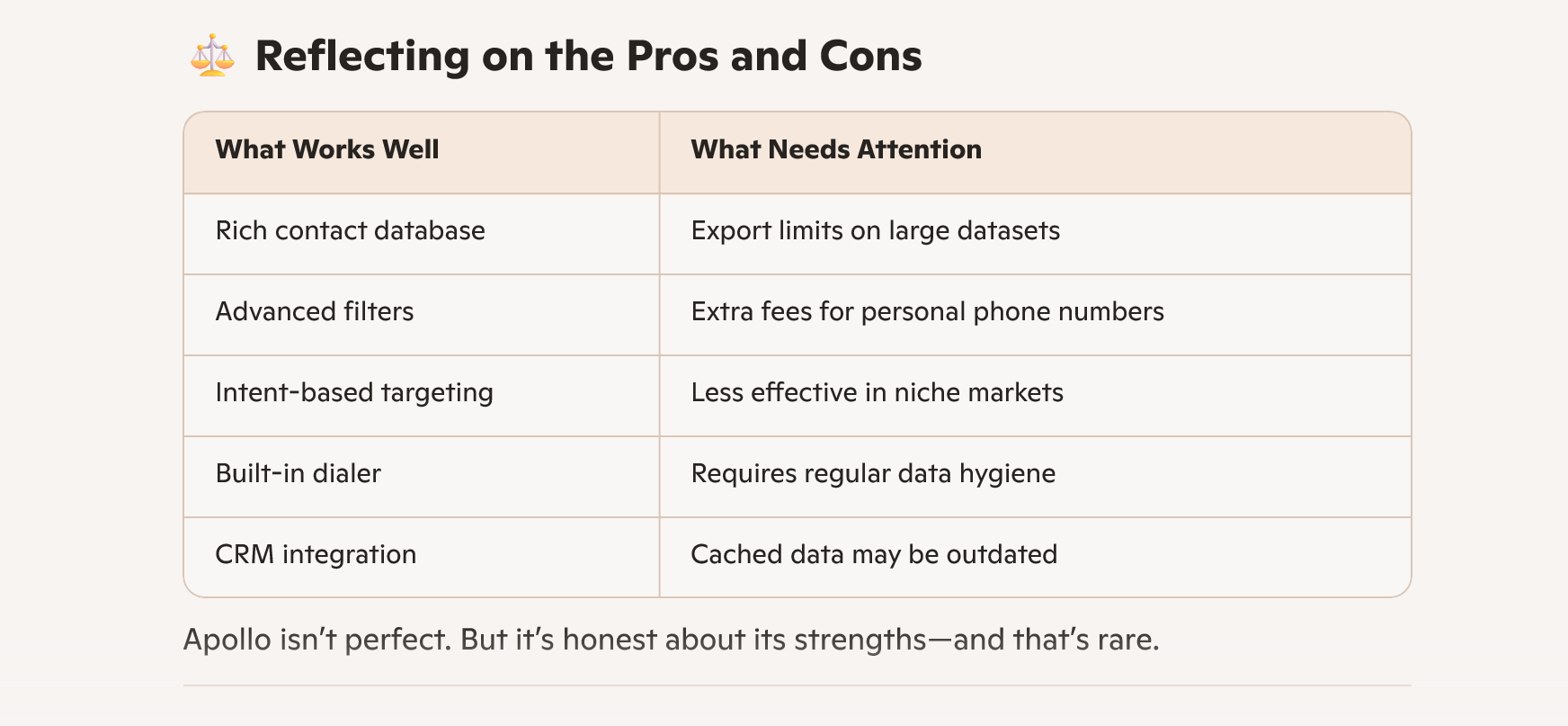
     Pros & Cons:

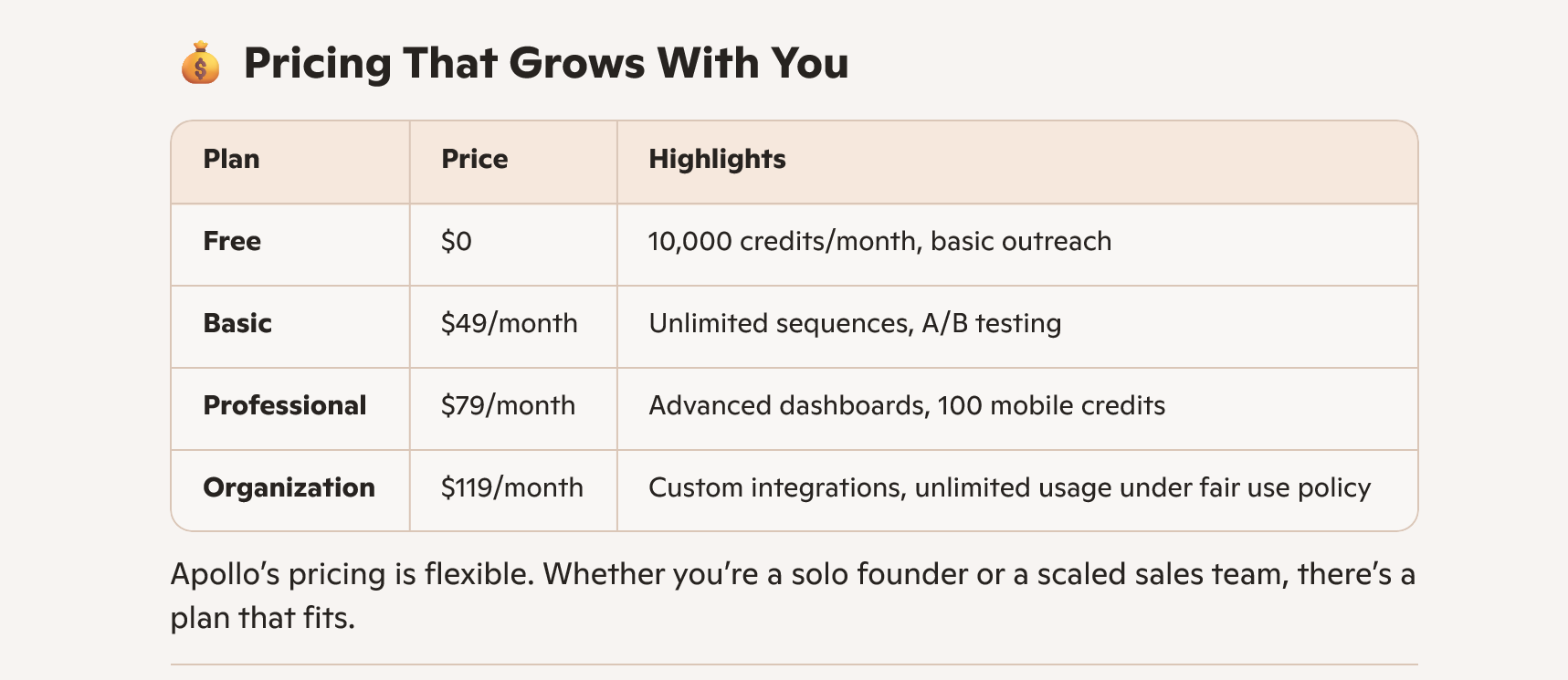
     Apollo Pricing Plans:

    Final Thoughts

    Apollo.io is a strong platform that enables sales teams to scale outreach, enrich data, and close deals quicker. Though it has some drawbacks—particularly in terms of email deliverability and niche targeting—its automation, integration, and lead intelligence capabilities put it at the front of the pack in sales tech.

    Whether you’re an enterprise or startup, Apollo.io provides the agility and firepower to level up your sales game.